Ambient photo display for venues

Every screen in the room, quietly telling one story.

Quietlight turns a folder of photos into a calm, unattended display across every connected screen. Point it at the folder, press Start, and walk away. It runs for hours without a hand on the keyboard.

Windows · 7 days, no card required · Photos never leave the machine

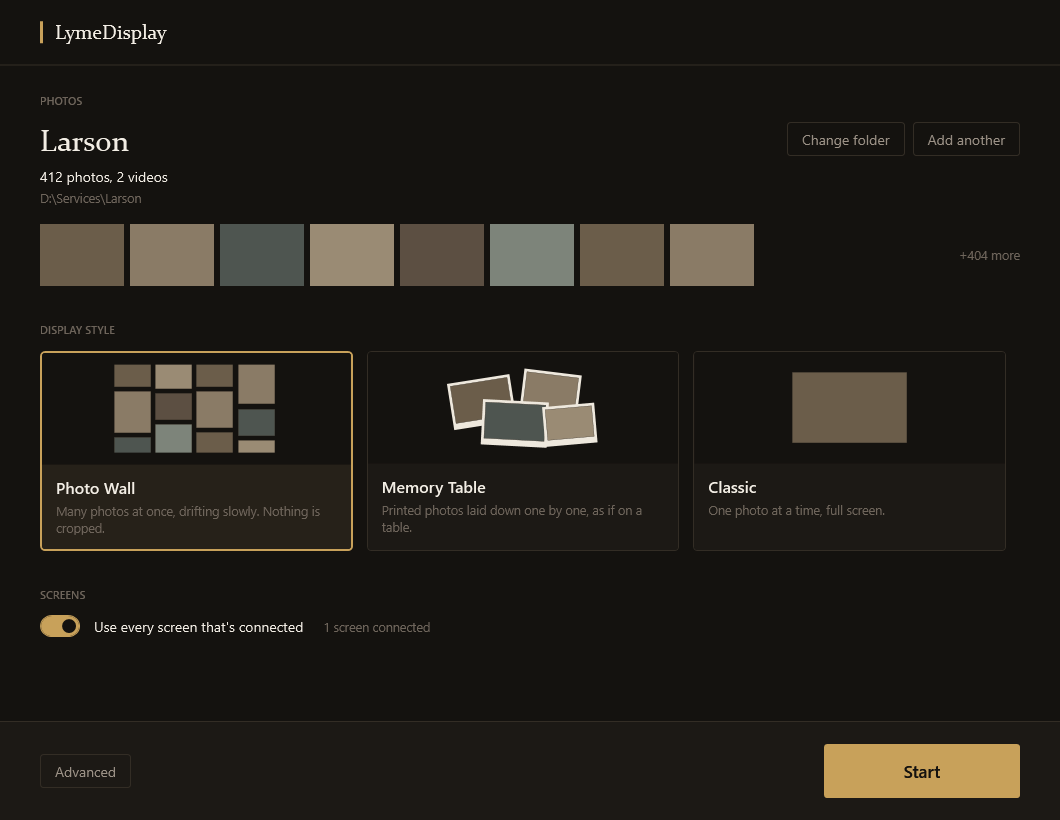
The Quietlight window: a chosen photo folder, three display styles to pick from, a screens toggle, and a Start button.

The whole application. Choose a folder, choose a style, press Start — there is no third step.

Where it runs

Built for rooms where nobody can babysit a screen.

Quietlight is digital signage stripped down to the one job most signage software does badly: showing a room full of photographs beautifully, for hours, without supervision.

01

Tribute & memorial displays

A family hands over a USB stick an hour before the service. Copy the folder, press Start, and the lobby and chapel screens carry the family's photographs through the visitation — no cropped faces, no repeating loop that anyone notices.

02

Receptions & celebrations

Anniversaries, retirements, milestone birthdays. A shared folder of photographs becomes the room's backdrop for the evening, across as many screens as the venue has.

03

Lobbies, galleries & waiting areas

A standing display that opens with the building and closes with it. Drop new photos into the folder and the next show picks them up.

Three display styles

Pick the feeling of the room.

One choice, made in a second, before you press Start. Every style runs on every screen you've connected.

Photo Wall

Many photographs at once, drifting slowly. Nothing is cropped — every picture is shown whole, whatever shape it is.

Memory Table

Photographs laid down one by one, as if someone were spreading prints across a table. Unhurried, and easy to watch from across a room.

Classic

One photograph at a time, full screen. The familiar slideshow, done properly — steady timing and clean transitions.

How it works

Three decisions, then it's out of your hands.

  1. Point it at a folder. A copied USB stick, a network share, a folder on the desk machine. Quietlight reads what's there — photos and videos alike.
  2. Choose a display style. Photo Wall, Memory Table, or Classic.
  3. Press Start. Every connected screen lights up and stays lit. Close the door behind you.

What happens while you're not watching

The unattended hours are the whole product. These are the behaviors that matter most.

  • Playback is never interrupted. Nothing — including licensing — can stop a running show. A license can only ever gate starting a new one.
  • It survives crashes and power loss. After an interruption it comes back and resumes where it left off.
  • No dialogs on the wall. Problems are handled quietly instead of popping up in front of a room.
  • Hours, not minutes. Designed for a full visitation or a full working day.

The rest of it

Quiet by design.

Every screen you've got

Two monitors or a wall of them — one show spread across all of them, or the same show on each. Connect the screens; Quietlight finds them.

Photos stay on the machine

Nothing is uploaded, to us or to anyone. There is no account, no sync, no cloud. A family's photographs stay where you put them.

Works with no internet

Once licensed, Quietlight runs offline indefinitely. A dropped connection is not an event.

Nothing gets cropped

Portrait phone photos, scanned prints, and wide landscapes all show whole. No faces cut off at the edge of the frame.

Videos too

Clips mixed in among the photographs, handled the same way — drop them in the folder and they play in turn.

A free player for the family

Hand back a USB stick that plays itself on any Windows machine — no install, no admin rights, no license. See the free player.

Pricing

One price, one location, paid once.

Try it free for seven days. If it earns its place, buy it once and keep it.

Quietlight license

$399 one-time, per location
  • Covers up to 2 machines at that location
  • Perpetual — no subscription, no renewal
  • Unlimited screens per machine
  • Runs offline; no account required
  • 7-day free trial before you decide
  • 30-day refund window

More than one location? Get in touch — chains and groups are priced together.

Free, forever

The portable player costs nothing.

Separate from the licensed application, there is a portable player that runs straight from a USB stick. No installer, no admin rights, no license, no restrictions — plug it in, double-click, and the show starts.

It exists so that a family can take the display home, and so that a venue can put a show on a machine they don't control. It is free because it should be.

The difference, briefly

The licensed application is the tool you work in: choose folders, choose styles, drive the room's screens, run unattended day after day.

The free player plays one prepared show and nothing else. Handing it to someone costs you nothing and asks nothing of them.

Try it on the screens you already have.

Seven days, the whole application, no card. If it doesn't fit the room, nothing happens when the trial ends.